Moon phases and lunar timing
How to Add a Free Moon Phase Widget to Your Website
Add a live Moon phase widget to your website with a copy-and-paste snippet. Includes language options, WordPress script requirements and troubleshooting.
You write a Moon-phase guide, publish it, and then the Moon carries on without consulting your editorial calendar. A small, automatically updated widget gives readers a way to check the current phase alongside your explanation.
Vedara's free Moon Today widget shows the phase, illuminated percentage, sidereal Moon sign, nakshatra and tithi, plus the next full and new Moon dates. You can add it to a public website using a short HTML snippet. No Vedara account or API key is needed.
Open the widget generator, or follow the steps below. Your website must allow external JavaScript in its HTML content.
What the Moon widget looks like
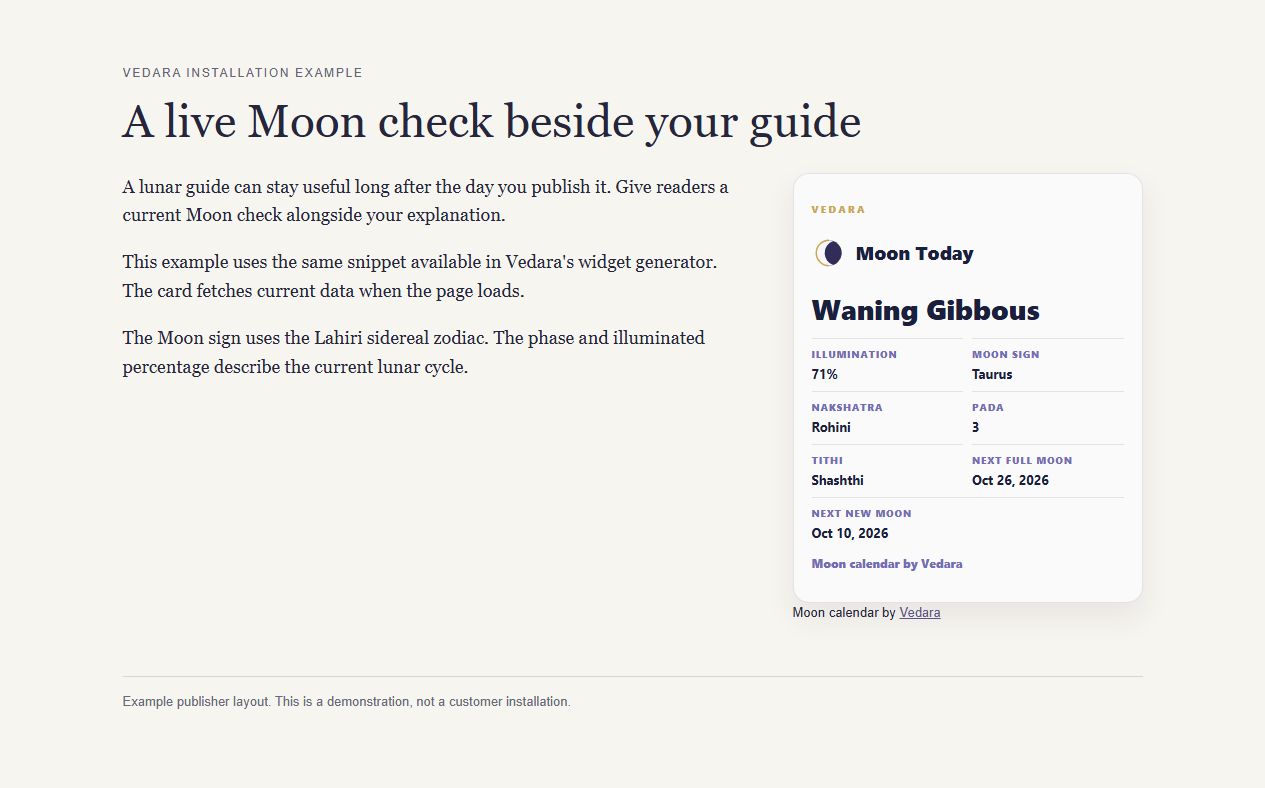
This is an installation example, captured on 1 October 2026. The values in the image are a snapshot; the widget fetches current data when your page loads.
The phase tells readers how much of the Moon appears illuminated and whether it is waxing or waning. The sidereal Moon sign is a separate field, calculated using the Lahiri system used in Vedic astrology. It can differ from the tropical Moon sign on a Western astrology website. The choice of zodiac does not turn a waxing Moon into a waning one.
The widget also includes nakshatra, the Moon's lunar mansion in Vedic astrology, and tithi, a lunar-day division based on the angle between the Sun and Moon. You do not need to collect readers' birth details to display these public sky calculations.
1. Choose the widget, language and theme
Open Vedara's free astrology widgets. Under Copy the embed code, choose:
- Widget: Moon Today, sidereal.
- Locale: the language you want the widget to display.
- Theme: Light, Dark or Auto. Auto follows the visitor's system colour preference, so choose Light or Dark if your page has a fixed background.
The available languages are English, Ukrainian, Russian, Hindi, French, German and Spanish. This setting changes the widget's language; it does not translate the rest of your website.
Select Copy snippet. Keep all three parts: the widget container, the script and the visible credit paragraph.
2. Paste the snippet into an HTML area
Paste the generated code where you want the widget to appear, such as below a lunar-calendar explanation or within a resources page. Use an HTML or custom-code area that permits scripts. A normal paragraph block may show the code as text instead of running it.
For an English widget using the visitor's colour preference, the snippet is:
<div class="vedara-widget" data-widget="moon-today" data-locale="en" data-theme="auto"></div>
<script async src="https://vedara.me/widgets/v1/vedara-widget.js"></script>
<p class="vedara-widget-credit">Moon calendar by <a href="https://vedara.me/tools/moon-phases">Vedara</a></p>
The final paragraph is part of the installation. Keep it visible, outside the script, with the supplied link and wording. It gives readers a route to the full Moon calendar.
A note for WordPress users
WordPress provides a Custom HTML block for inserting markup. Script support depends on your hosting setup and editing permissions. On WordPress.com, its current documentation requires a paid plan with hosting features activated for script tags. If your editor removes the script when you save, the widget cannot load through that block.
Check WordPress.com's Custom HTML guidance before changing your plan. On a self-hosted WordPress site, ask your site administrator whether your account and configuration allow external scripts. The embed code above has been checked on a standalone HTML page; this guide does not claim that every WordPress theme or hosted-site plan has been tested.
3. Check the published page
Save your changes and open the actual page in a fresh browser tab. Some editors show code previews differently from the public page.
Check that the Moon card loads, the credit remains visible, and the widget fits on a phone without pushing the page sideways. Follow the credit link once to confirm that it opens the Moon Phase Calendar.
If the card does not appear:
- You can see the code itself: move it from a text block into an HTML area.
- Only the credit appears: check whether your editor removed or blocked the script.
- The widget reports an error: reload once and compare with the live preview on the widgets page. A site administrator can check script restrictions, content security rules or failed requests.
- The colours clash: return to the generator, select a fixed Light or Dark theme and replace the snippet.
Avoid promising readers a permanently fixed value in the surrounding text. A heading such as "Check today's Moon" will still make sense next week.
Adding a planetary-hours widget instead
If you publish about planetary timing, select Planetary Hour Now in the same generator. It shows the current ruler, its ending time, the next ruler and the day ruler.
Check the location label before publishing. The default preview currently uses an approximate London location. A browser timezone is not enough to determine a visitor's latitude and longitude. Do not describe the default embed as accurate for every reader's location.
For a reader who needs their own local schedule, link to the Planetary Hours Calculator, where they can set the location. Our practical planetary-hours guide explains why sunrise and sunset matter.
The generator also offers Saturn and Sade Sati status, and today's sidereal planetary positions. Choose the card that supports the page your reader is already using.
Cost, credit and visitor data
The widgets are free for public websites with the supplied visible credit. They fetch calculated sky data from Vedara and do not require a visitor to sign in.
The widget service does not set tracking cookies. Its endpoint records the embedding host so Vedara can see which sites use the widgets; the widgets page states that it does not log visitor IP addresses. Your website's own analytics and privacy settings remain separate.
The code runs on a web page. It is not a live widget for an email newsletter or a social post. For those formats, link readers to your page or the Moon calendar.
Give readers the next useful step
Place the card near the explanation it supports. On a Moon guide, a short line such as "Check today's phase here, then use the guide below to understand the cycle" is enough. Our guide to Moon phases provides more background if your readers need it.