
The sky today
No Vedara account needed
Use Vedara to show today’s sidereal sky. Ask which timezone to use, then explain the planetary signs and nakshatras in plain language. Separate calculated facts from interpretation.
VEDARA FOR CHATGPT
Bring your birth chart into the conversation. Vedara calculates the chart; ChatGPT helps you explore it, one question at a time.
Open Vedara in ChatGPTTry the calculation tools for free. No Vedara account required. Install with your ChatGPT account.
Follow the illustrated guide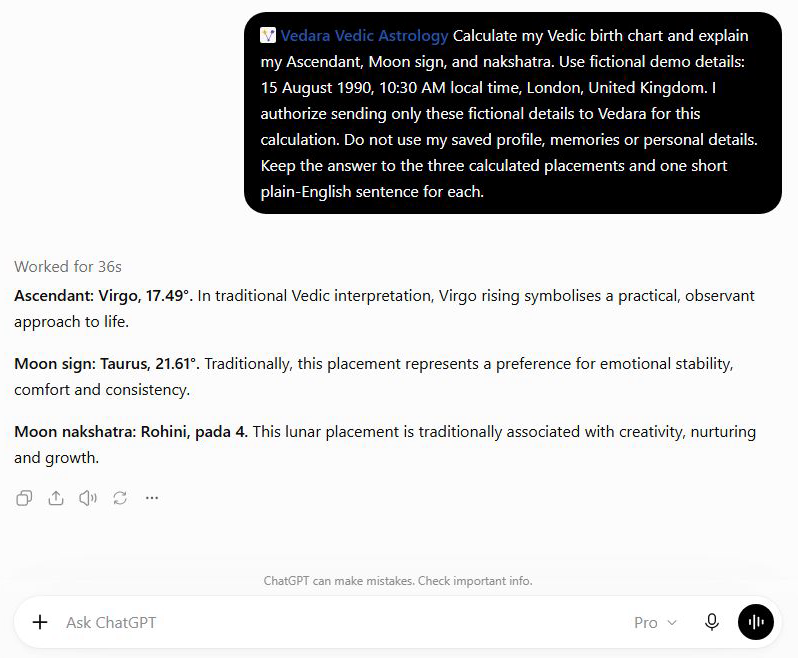
From curious to connected
After connecting Vedara, copy a prompt into ChatGPT. Start with the sky today if you would rather not share birth details.
No Vedara account needed
Use Vedara to show today’s sidereal sky. Ask which timezone to use, then explain the planetary signs and nakshatras in plain language. Separate calculated facts from interpretation.
No Vedara account needed
Help me understand my Vedic birth chart (Kundli) with Vedara. Ask for my birth date, time and place, and ask before sending them to Vedara. Explain my Ascendant, Moon sign and nakshatra using the calculated chart.
Connected Vedara account with a completed birth profile
Using my connected Vedara birth profile, show today’s Panchang, Rahu Kaal and personal timing factors. Explain the timezone and any limitations. Do not repeat my stored birth details or promise outcomes.
Example birth details: 15 August 1990, 10:30 local time, London, United Kingdom.
This is a summary of a checked result, not a live reading or a customer testimonial.
What the calculation returned
You can then ask ChatGPT what Virgo rising means in Jyotish. That explanation is an astrological interpretation; the calculation does not establish someone’s personality or future.
Without a birth time, Vedara cannot establish the Ascendant or houses. Ask it to explain what can be calculated from the details you do know, rather than fill in a time.
To use a saved chart or personalized daily timing, connect your existing Vedara account. These tools are also free and use your completed birth profile, so you do not need to re-enter it.
Vedara offers reflective guidance, not medical, legal, financial, or safety-critical advice. Birth details are used only for the requested calculation, and saved-profile tools never return your stored birth details or account identifiers.
Open Vedara in ChatGPT